How labels use SESH: PO numbers and the paper trail
No separate account, no signup flow — just two optional fields at checkout that let a coordinator book for an artist and hand the receipt straight to procurement.
There's no "label account" — this is just checkout
Any SESH account can do everything below. A label doesn't sign up differently or unlock a business tier — a coordinator books the same way anyone does, and two optional fields at checkout carry the paperwork a label actually needs.
Add session details at checkout
On a listing page, a collapsed "Add session details" link sits below the date and time — closed by default so it stays invisible to the guest who has never needed it, one click away for the one who has. Open it and there are two fields:
- ·Artist or project — who the session is actually for, when that isn't you. Shown on Recording Studio, Rehearsal Space, and Session / Engineer / Teacher listings; not shown on gear, since nobody books a synth "for" someone. Only the host ever sees it — never on the listing, never in a review.
- ·PO number — your own purchase order number, free text, on every listing type including gear. Printed on the receipt so it can be forwarded for approval.
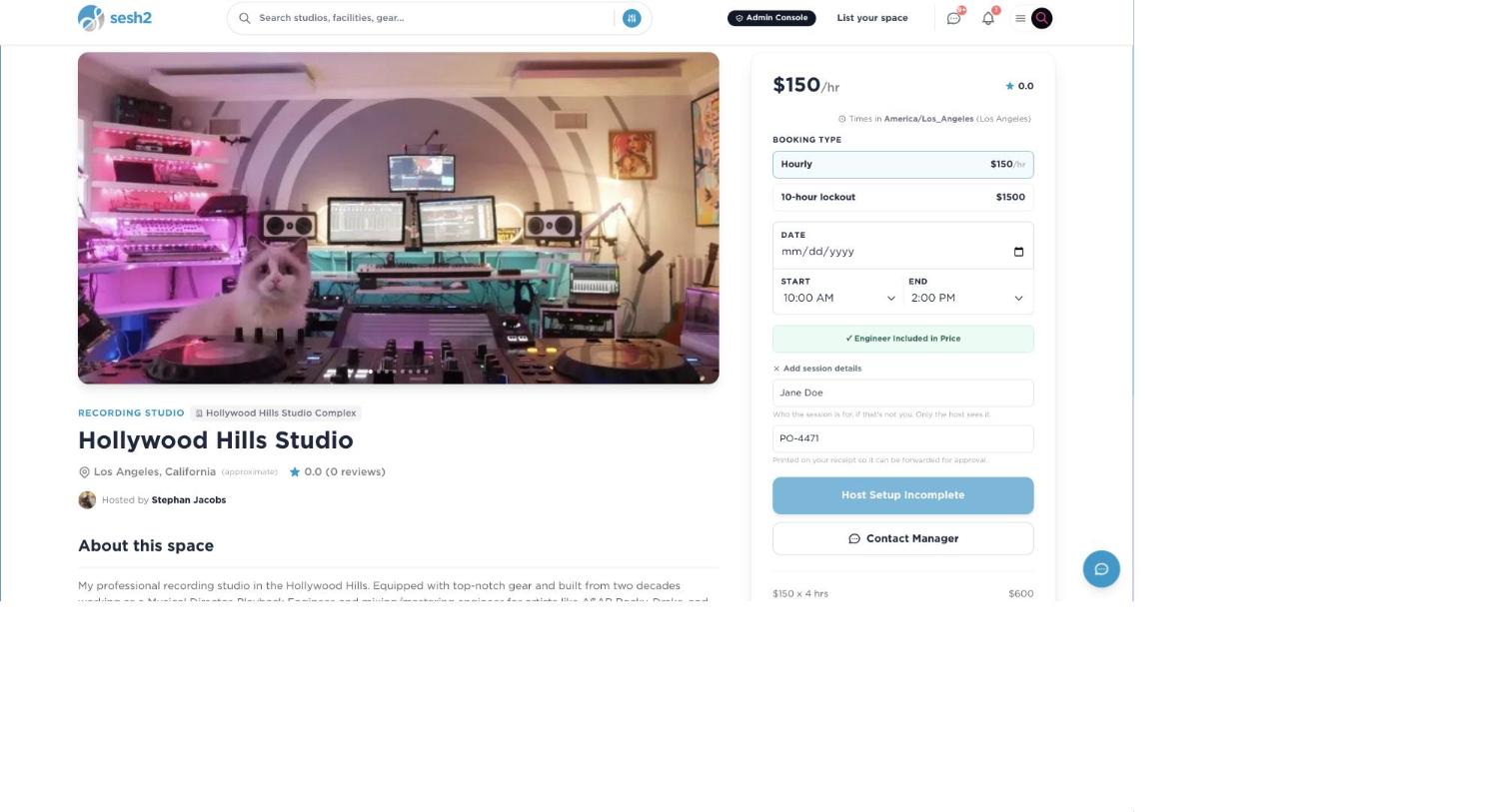
On desktop
Where it actually shows up afterward
The receipt is the one place both fields are printed together, right under SESH's own reference number: Ref, then PO, then Artist. That receipt lives in the booker's own dashboard and can be pulled up any time.
The PO number is also included in the confirmation email, so it's in writing the moment the booking clears. The artist name isn't — it's deliberately kept off anything that leaves the platform, on the same "host-visible only" logic that keeps it off the listing.
One more quiet use: if you gave an artist name, it's what shows up in the host's Google Calendar event title instead of your own name — useful the moment a studio is coordinating more than one booker.
Finding a booking again
Both dashboards' search box matches PO numbers directly — type "PO-4471" into the search on either side and it finds the booking, the same as searching by guest name, listing, or date. Artist name isn't part of that search today; only the reference and PO number are.
What this isn't — worth knowing before you rely on it
A few honest limits, so a real reconciliation workflow doesn't get built around something that isn't there yet:
- ·One receipt per booking. There's no combined statement across many bookings — reconciling a batch today means pulling receipts individually or matching them by reference.
- ·The CSV export (free on every plan) includes SESH's own reference number, but not the PO number or artist name as columns.
- ·Booking a facility's Session Builder — a room plus gear plus talent in one package — doesn't currently offer the Artist/PO fields at all. They only exist on an individual listing's own page.
- ·PO numbers aren't saved or reused. There's no "default PO" on your account — it's typed fresh every time.
Worth knowing
- ·Booking through a widget embedded on a studio's own site works the same way — "Continue" opens the real checkout on sesh2.com in a new tab, and the same Add session details section is there.
- ·Leave both fields blank if you don't need them. Nothing about checkout changes, and nothing downstream expects them.
- ·A solo musician booking for themselves is the artist — there's no requirement to fill in a name that's already obvious.
Creating promo codes for your own audience